PUBLISHING DESIGN - TASK 1: EXERCISES

Lecture 01: Formats
The Book
- The book is one of the most important and influential formats as most important publishings centred around books.
- A book is used as a medium to document & share ideas, knowledge, records, history & etc.
- To design a book, a comprehensive understanding of typography, a good sense of space, an eye for details & a good understanding for publishing software is needed.
- It is important to care for the audience who will read the book.
- It is counterproductive to design a book in Illustrator.
- The user. (Example: If it was a child, you would want to make a book which fit the size of their hands. Another is the material depending on the age group)
- Content of book. (If type of book being designed has various contents, a larger sized book would be considered to include all the information possible)
- Constitutes the binding, material, size, etc.
Innovation almost always shadows technology. Opportunity is created by new technology.

- In Mesopotamia, the first writing system was developed from counting technology.
- The progression from simple & complex tokens to the bullae provided an opportunity for the early forms of pictographic writing on clay tablets.

- In the Indus River Valley Civilizations, there are not many known records, but it is known that they had a complex system.
- Cuneiform, their writing, was one of the earliest systems of writing. They were written on soft clay tablets by using sharp pointed tools.
- Religion, government & trade were the topics of their records.

- The oldest surviving Palm leaf Manuscript originated from Nepal in the 800-900 CE.
- It is known that palm manuscripts may have been used since 1000 BCE in the Indus Valley.

- In Egypt, only scribes could read & write Hieroglyphics.
- Scribes would write on a papyrus [a special type of paper which is made from the pith of a papyrus plant] as well as the tomb walls.

- Chinese characters in the early period were written in vertical columns. This meant a thin strip of bamboo was ideal for one column.
- For a longer document, bamboo strips were linked by two lines of thread.

- The earliest known printed book is Chinese from the T'ang Dynasty.
- It was discovered in a Dunhuang cave in 1899.
- The material used was paper and in a scroll format.

- Printing from wood blocks is a laborious process.
- In the 10th & 11th century, Confucian classics were published for the scholar official's use together with a wide variety of Buddiest & Taoist works.
- The innovation of carving in reverse on wood blocks seems to have been pioneered in China but achieved in Korea.

- Parchment was invented in Turkey (197-159 BC).
- It is made from animal hide and was too heavy to be made into scrolls.

- The use of paper would make a slow journey west.
- Paper became widely available to Europe during 1400-1500 CE.
- The folding format took a goot hold in the west @ the turn of the century.
- Wooden blocks with thread sewn to hold them together and then with parchement and later with paper, where paper was sewn, bound and glued together.

Lecture 02: History of Print
2nd - 8th Century AD
In AD 175, the Emperor of China commands that the six main classics of Confucianism is to be carved into stone. The Confucian scholars were eager to own the important texts which made them lay paper on the engraved slabs and rub it with charcoal or graphite.


Korea & Japan: AD 750-768
The invention of printing is a striking achievement of East Asian Buddhists. The earliest known printed document is a sutra printed on a single sheet of paper in Korea in AD 750.

In AD 768, Buddhist Nara, the empress commissioned a large lucky charm or prayer. The project supposedly took six years to complete, and the number of copies printed is a million as they were distributed to pilgrims.
The Hyakumantō Darani is a famous woodblock print. The earliest of these records are in Japan.

The first printed book: AD 868
[See Figure 1.1.7]
The scroll is 16 feet long and a foot high. It was formed by gluing paper edges together. The first printed illustration was in the first sheet of the scroll, which depicted enthroned Buddha surrounded by Holy Attendants.

Movable type: from 11th century
Movable type (separated ready made characters/letters which can be arranged in the correct order for a particular text and then reused) is a necessary step before printing became an efficient medium for spreading information. As early at the 11th century, the concept was experimented in China. The problems were that Chinese script had too many characters that type-casting & type setting became too complex. Another is that Chinese printers cast their characters in clay and then fire them as pottery, making it too fragile for the purpose.
Type foundry in Korea: c.1380
In the late 14th century, Koreans established a foundry to cast movable type in bronze. Bronze is a strong medium for repeated printing, dismantling & resetting for new text. At the time, the Koreans still used Chinese script so they had the problem of a high number of characters. In 1443, this was solved when they invented their own alphabet, aka ashan'gul.
Saints & Playing Cards: AD c.1400
Around 1400, the technique of printing from wood blocks was introduced in Europe. Like in the east, the images were printed by the simple method of laying a piece of paper on a carved and inked block and then rubbing its back to transfer the ink. Like in the east, the main market is holy images for sale to pilgrims. Playing cards are another early part of the western trade.

Gutenberg & Western Printing: AD 1439 - 1457
The name of Gutenberg first appears, in connection with printing, in a law case in Strasbourg in 1439. Nothing in this period survived but Gutenberg was said to have been capable of printing small items of text from movable type which is done so in Strasburg. The next time Gutenberg is heard in relations to printing, he borrowed 800 guilders in 1450, Maine, from Johann Fust with his printing equipment as security.
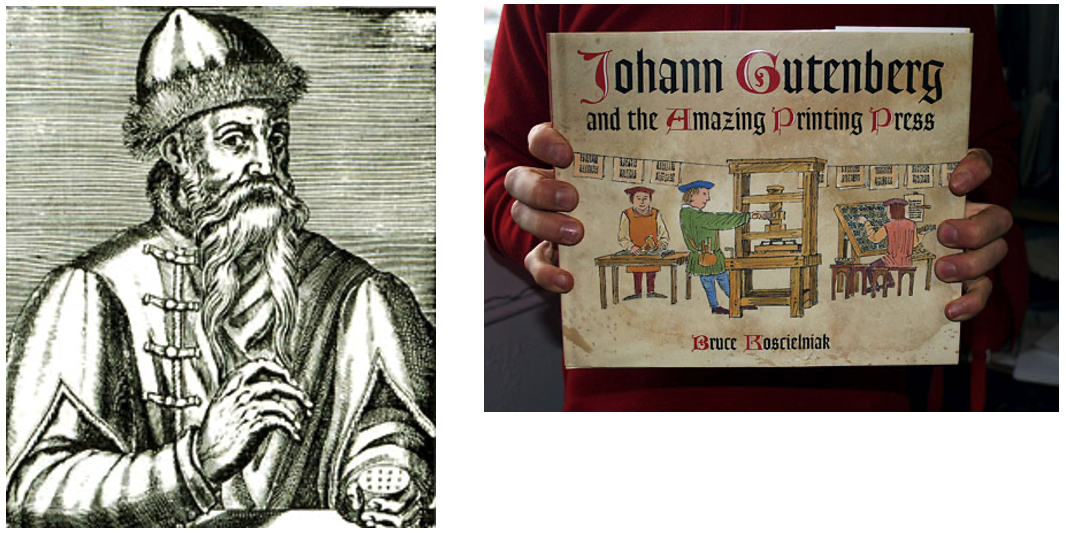
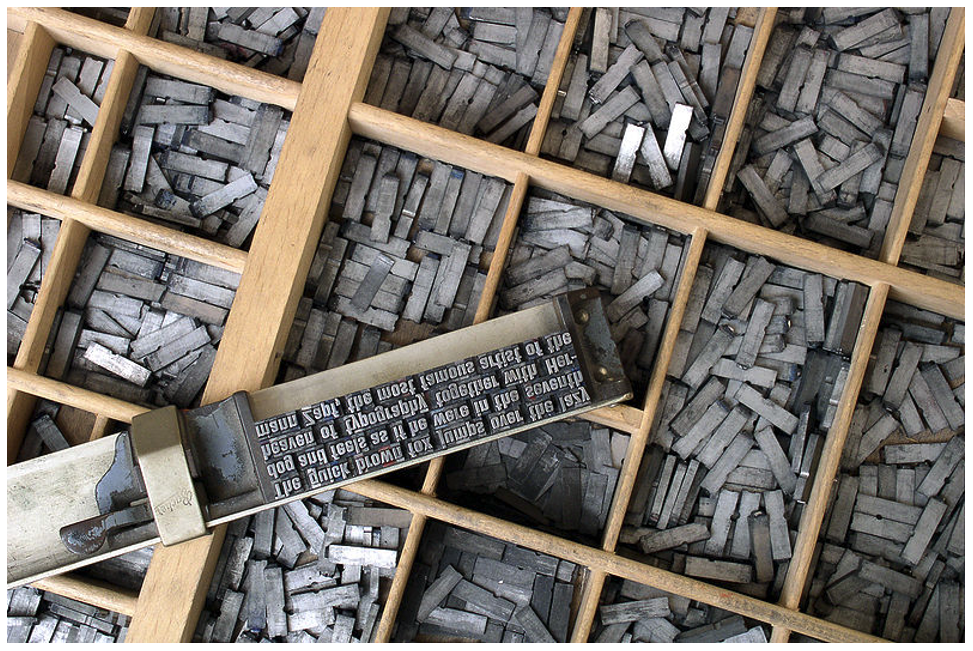
One of Gutenberg's development of the printing press, capable of applying a rapid & steady downward pressure. Gutenberg's skills with metal enabled him to master the complex stages in the manufacture of individual pieces of type, which involve creating a master copy of each letter, devising the moulds in which multiple versions can be cast, and developing a suitable alloy (type metal) in which to cast them. This skillful technology precedes the basic work of printing (arranging the individual letters, aligned and well spaced, in a form which will hold them firm and level to transfer the ink evenly to the paper).
In the Gutenberg Bible, there was no dates. It was printed simultaneously on six presses during the mid 1450s. At least one copy is known to be completed, with initial letters coloured red by hand in 24 August 1456.

Lecture 03: Typography Redux
Typography
To a graphic designer, typography is like oxygen. It is the most important area in graphic design to master to set ourselves up to good standards. It is the art of arranging & composing text. It also serves as a medium for expression and most importantly communication. In design work, it plays a central role.
In book design, our understanding & sense developed in the past two semesters will play a crucial role.
Characters in a typeface
- Small caps
- Numerals
- Fractions
- Ligatures
- Punctuations
- Mathematical signs
- Symbols
- Non-aligning figures


Legibility
To ensure that a body text is readable, the heeding established legibility guidelines is most important for this. To go out of these rules require a designer who is completely knowledgable of these rules. To make type legible, it is required to choose typefaces which are open & well proportioned.


With computers, there were many new features when it came to typesetting. However, this came with problems where people weren't aware of the typographic rules, which violates them at the expense of the reader. To ensure that type is legible, certain considerations have to be taken on.
- Underline: Many programmes carry out the underlining incorrectly as it should be lowered in order to not touch the characters as it affects readability. There is two types of underlines; one that focuses on each word, and another that focuses on the sentence as a whole.

- Small Caps & All Caps: Small capitals are good for subheads for the first line of a paragraph. Text set in All Caps should be used in short headlines or subheads. It is to note that All Caps are forbidden to be used for long sentences and for emphasis. Capital letters were meant to be punctuated instead of using as freely.

- Special-Purpose Style: Many formatting styles exist within softwares for making footnotes, references & mathematical formulas. These are usually embedded or nested within the tools sections and a normal user may not be aware.

- Text Scaling: Some programs allow for the creation of a pseudo-condense or pseudo-extended font by horizontally or vertically squeezing or stretching as font. This distorts the original design of the font, making it look cheap.

- Outline & Shadow: Another style that tends to be abused. It takes many years of experience before one can format text beautifully and effectively. For outline, it should not exceed 1pt. Be careful that shadows do not do away too far from the main text.

Text that flows harmoniously when read is achieved when a harmonious relationship exists between the type sizes, line lengths & spaces between the lines of type. Legibility impairment has no judgements and can even affect well designed typefaces. A column of type is usually about 50 characters and should have 65 maximum. If not, it would be too crammed and make the words hard to read.
Leading/line spacing refers to the amount of space between lines of type. As with type size, there are no set rules for how much line spacing to use. However, there are some factors to consider:
- The font used: Some require more line spacing than others to keep their ascenders and descenders from touching.
- The line length: Longer lines require more leading for easier reading
- The type size: The larger the type size, the more line spacing is require. This rule mostly refers to body copy; headlines which are normally larger set, may actually be set with tighter line spacing.
Overly long or short lines of type also tire the reader and destroys a pleasant reading rhythm.


Depending on the program used to format text, extra attention is needed. Larger type sizes require adjustments to the space between characters and paragraphs need to be adjusted to avoid widows and orphans.
Kerning: Inter-character spacing, aka kerning, creates a more pleasing look to the text. Most word processors do not allow kerning adjustments and most page-layout programs apply kerning adjustments and most page-layout programs apply kerning automatically. However, certain letter combos may need manual adjustments.

Tracking: It is similar to kerning but refers to the adjustment of a selection of characters, words and spaces. The main purpose if to make type fit a required space without altering the type size or line spacing. It can be negative or positive. An important use is to fix single words or the end of a paragraph.
Word spacing can determine the correct word spacing which includes the typeface chosen. Consistent spacing makes an even typographic "colour".

Italics: Should be used with prudence. Large amounts of slanted text impede reading. It is best used to create emphasis within text rather than to function as text.
Capitals: Consumes more space, and impedes the reading process. It lacks visual variety.
Alignment
Flush left, ragged right: Produces very even letter and word spacing. Since the line terminates at different points, it is easier to locate the new lines. It is the most legible of aligning text.
Flush right, ragged left: Works against the reader. Suitable for small amounts of text, but not recommended for large amounts.
Centred alignments: Give a very formal appearance and is good when used minimally. However, setting large amounts of text this way should be avoided.
Justified text: Can be very readable if its design ensured spacing between the words are consistent and that awkward rivers do not interrupt the flow of the text.
Paragraph Spacing
Paragraph space is an automatic space between each paragraphs. It can be placed above or below paragraphs. It is more elegant than simply double spacing returns.

Paragraph Indent
Indentation should be used if there is justified text. If there's usage of both indentation and paragraph space, it can be too much. If the type size is 10pts, the indent should also be 10pts.
Special Formatting
Hyphens are mainly used to divide words or numbers, but they can also be used to break words from one line to the next. Headlines and subheads should never be hyphenated at a line ending.

Often, lines need to be broken for readability. Just typing a return to break the line can alter formatting when the intention is to break the line. To avoid the problem, most programs allow line breaks (Shift+Return)

Drop caps are used to start off new chapters and special sections of a report. It should not exceed three lines. If the program does not have auto settings, they should be avoided.

DeskTop Quotes:

Side Bar:
It accompanies the main body copy. It highlights alternate narratives or facts.

Lecture 04: The Grid
Raster Systeme
Modern design knowledge comes from designers’ shared ideas and experiments. Brockmann sees the grid system as both a design tool and a reflection of a designer’s logical, structured, and professional way of thinking.


Modular
The grid system makes design clear, logical, and elegant, improving engagement, understanding, and memory. It is like the hidden framework behind architecture — not visible, but supporting the entire design.
Lecture 05: Elements
All publication consist of 3 major elements:
- Type
- Colour
- Image
Variation
To avoid predictability in a grid system, create variation in how text, colour, and image are combined and arranged, while keeping certain elements consistent (e.g., typeface, colour scheme, image style). This balance is best learned through practice.

For our book, we were tasked to write or source 3000 words of material. Below is the draft for my content.
Exercise 2: Mock-up Making
Thus, I tried the following sizes:
- 190mm x 275mm
- 180mm x 250mm
- 200mm x 230mm


- General Feedback:The A3 paper folding exercise helped me understand book structure, page order, and physical format, while the 3000-word content helped establish the theme and direction of my publication. Both tasks prepared me well for the next stage of design development.
- Specific Feedback:The A3 folding task improved my understanding of how a flat sheet can be transformed into a booklet and helped me learn page sequencing more clearly. Choosing the book size early was useful for future layout planning.
- General Feedback:The professor required using the student's ID number to generate the book code,The 3000-word text has been processed with the required code generation and highlights. The student is now ready to move on to the next task.
- Specific Feedback:The number of characters per line can vary from 45-65 depending on what is required. Use left justification instead of full justification, so your lines can feel clean and justified.
- General Feedback:The professor's help in structuring the text gave me a clearer understanding of how to organise chapters, sidebars, and captions. His feedback on the visuals made me realise the importance of consistency and rhythm in book design. Overall, I made solid progress in both content generation and visual exploration this week.
- Specific Feedback:The professor gave specific suggestions on my AI-generated images: the image sizes should not be uniform — use a mix of large, medium, and small; the colour palette should be consistent; and the visual complexity should vary, with some images detailed and others simpler.
Experience
During the first three weeks, I focused on establishing the foundation of my publication project. I completed the A3 paper-folding exercise to understand book construction and page sequencing, prepared and organised the 3000-word content, generated the required book code, and planned the overall structure of the publication. At the same time, I explored typography, layout principles, and visual development by researching references and creating initial AI-generated visuals for the book.
Observation
Throughout this process, I observed that successful publication design requires a balance between content, structure, and visual presentation. The paper-folding exercise helped me understand how page arrangement influences the reading experience, while the content organisation process highlighted the importance of clear chapter structures, captions, and supporting information. Through the lecturer’s feedback, I also realised that typographic decisions such as alignment, line length, and spacing significantly affect readability. In addition, I noticed that maintaining a consistent colour palette and visual style creates a stronger identity, while varying image sizes and levels of detail makes the design more dynamic and engaging.


评论
发表评论